Icon of program: Photovault

Photovault for Windows

  • Free
  • 3.2
    14
  • 20.8K
  • V0.5.0
Free Download for Windows

View an ad to download for free

Archive and publish your digital photos

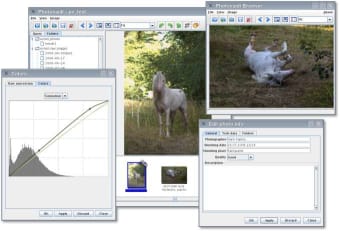
If you're someone who has a large volume of photographs then Photovault can help you organize, publish and manage them with relative ease. Considering it is free, the program is surprisingly powerful, with the capacity to take thousands of photos and package them neatly into virtual folders.

Unlock your creativity with Adobe Stock

Get 10 images or 1 video with a free trial

For amateur photographers the program is a dream and includes tools for RAW format conversion, colour correction, cropping, rotating and brightness/contrast balancing.

We were also impressed by the way it allows you to sort your images using the metadata stored within the picture files. Not only does this help you organize your collections by date, but you can also sort on a wide range of other variables, such as location, time of day, name or photographer.

Although you won't find many fancy special effects tools within Photovault, the program performs a decent job of whipping your snaps into shape.


  • Pros

    • Impressive metadata sorting capabilities
    • Easy-to-operate correction tools
  • Cons

    • No flash special effects or editing features
 0/1

App specs

  • Developer

  • License

    Free

  • Version

    0.5.0

  • Latest update

  • Platform

    Windows

    Other platforms (2)
  • OS

    Windows XP

  • Language

    English

  • Downloads

    20.8K

    Last month's downloads

    • 5

Also available in other platforms

Program available in other languages


Icon of program: Photovault

Photovault for PC

  • Free
  • 3.2
    14
  • 20.8K
  • V0.5.0
Free Download for PC

View an ad to download for free


User reviews about Photovault

Have you tried Photovault? Be the first to leave your opinion!

Add review

You may also like

Alternatives to Photovault

Explore Apps

Latest articles

Laws concerning the use of this software vary from country to country. We do not encourage or condone the use of this program if it is in violation of these laws.
Softonic

Is Photovault safe?

100/100

Score result: Clean

This file passed a comprehensive security scan using VirusTotal technology. It is safe to download.

  • Virus free
  • Spyware free
  • Malware free
  • Verified by Security Partners

    VirusTotal logo

Scan Info

Last scan
Thursday, July 8, 2021
Scan provider
VirusTotal

Softonic security commitment

Photovault has been thoroughly scanned by our advanced security systems and verified by industry-leading partners. This file comes from the official developer and has passed all our security checks, showing no signs of viruses, malware, or spyware. For more information, visit our Security and Trust Center

Signed in to Softonic as